Python Data Analysis Basics: Handling Stock Data with pandas
An introductory guide to loading, cleaning, and basic analyzing stock data using pandas in Python. The starting point for quant analysis.

Why pandas?

Handling stock data requires working with numbers sorted by date. While Excel can do this, it becomes slow and difficult to automate when dealing with tens of thousands of rows.
pandas is the standard library in Python for working with tabular data. It’s widely used in quant analysis, data science, and financial modeling.
Installation and Getting Started
pip install pandas yfinance matplotlib- pandas: data analysis
- yfinance: download free stock data from Yahoo Finance
- matplotlib: plotting charts
Loading Stock Data
Bitcoin Data from Yahoo Finance
import yfinance as yf
import pandas as pd

# Bitcoin daily data (2 years)
btc = yf.download("BTC-USD", period="2y")
print(btc.head())
Sample output:
Open        High         Low       Close    Volume
Date
2024-04-08   69543.12   71842.15   68902.31   71015.94  32844900
2024-04-09   71015.94   71655.25   69241.84   69785.52  30492100
...
Column explanations:
- Open: Opening price (first trade of the day)
- High: Highest price during the day
- Low: Lowest price during the day
- Close: Closing price (last trade of the day)
- Volume: Trading volume
Korean stock data
# Samsung Electronics
samsung = yf.download("005930.KS", period="1y")
print(samsung.tail())
Basic Data Exploration
Checking data size
print(f"Number of rows: {len(btc)}")
print(f"Period: {btc.index[0]} – {btc.index[-1]}")
print(f"Columns: {list(btc.columns)}")
Basic statistics
print(btc['Close'].describe())This provides mean, min, max, standard deviation, etc.
Filtering specific periods
# Data only for 2025
btc_2025 = btc.loc['2025']

# First quarter of 2025
btc_q1 = btc.loc['2025-01':'2025-03']
Calculating Returns
A very common calculation in quant analysis.
Daily returns
btc['daily_return'] = btc['Close'].pct_change()
print(btc['daily_return'].tail())
pct_change() computes the percentage change from the previous day. For example, 0.03 indicates a 3% increase, -0.02 indicates a 2% decrease.
Cumulative return
btc['cumulative'] = (1 + btc['daily_return']).cumprod()
print(f"Total return: {btc['cumulative'].iloc[-1] - 1:.2%}")
Calculating Moving Averages
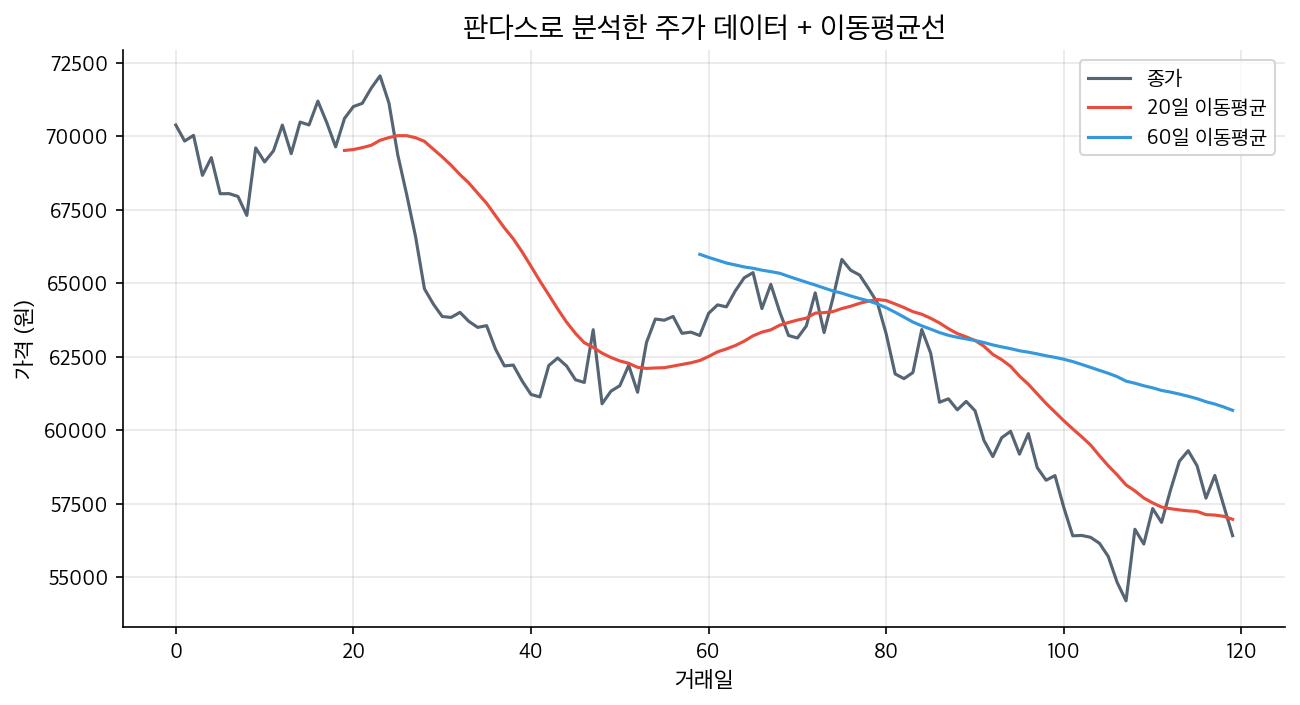
Moving averages smooth out price data by calculating the average over a set period. They are basic tools for identifying trends.
# 20-day moving average (short-term)
btc['ma20'] = btc['Close'].rolling(20).mean()

# 60-day moving average (mid-term)
btc['ma60'] = btc['Close'].rolling(60).mean()

# 200-day moving average (long-term)
btc['ma200'] = btc['Close'].rolling(200).mean()
Finding Golden Cross / Dead Cross
# Golden cross: short-term MA crosses above long-term MA
btc['golden_cross'] = (
(btc['ma20'] > btc['ma60']) &
(btc['ma20'].shift(1) <= btc['ma60'].shift(1))
)

golden_dates = btc[btc['golden_cross']].index
print(f"Number of golden cross events: {len(golden_dates)}")
for d in golden_dates[-5:]:
    print(f"  {d.date()}")
Plotting Charts
Close price + Moving Averages
import matplotlib.pyplot as plt

plt.figure(figsize=(14, 6))
plt.plot(btc.index, btc['Close'], label='Close Price', linewidth=1)
plt.plot(btc.index, btc['ma20'], label='20-day MA', linewidth=1)
plt.plot(btc.index, btc['ma60'], label='60-day MA', linewidth=1)
plt.title('Bitcoin Daily Chart')
plt.xlabel('Date')
plt.ylabel('Price (USD)')
plt.legend()
plt.grid(True, alpha=0.3)
plt.tight_layout()
plt.savefig('btc_chart.png', dpi=150)
plt.show()
Daily returns distribution
plt.figure(figsize=(10, 5))
btc['daily_return'].hist(bins=100, alpha=0.7)
plt.title('Bitcoin Daily Return Distribution')
plt.xlabel('Daily Return')
plt.ylabel('Frequency')
plt.axvline(0, color='red', linestyle='--')
plt.tight_layout()
plt.show()
Common pandas functions summary
| Function | Example | Usage |
|---|---|---|
| Add column | df['new'] = df['Close'] * 2 | Create new indicators |
| Filtering | df[df['Close'] > 70000] | Conditional selection |
| Sorting | df.sort_values('Volume') | Sort by volume |
| Grouping | df.groupby(df.index.month).mean() | Monthly averages |
| Handling missing data | df.dropna() | Remove NaNs |
| Saving | df.to_csv('data.csv') | Save to file |
Next Steps
Working with pandas is the foundation of quant analysis. From here, three main directions are suggested:
Implementing Technical Indicators: Calculate and visualize RSI, MACD, Bollinger Bands, etc.
Backtesting: Develop trading rules and test their performance against historical data.
Automated Trading: Connect to exchange APIs for real-time trading automation.
No matter which path you choose, pandas will be a core tool. Mastering these basics will make advanced steps much easier.
Recommended Articles
What is an LLM Agent? Easy guide from concept to quant investment applications
RunPod vs Vast.ai: Practical comparison of local LLM and backtest GPU rental
Bitcoin News Sentiment Analysis: Techniques to read market psychology and investment strategies
Related Posts



Newsletter
Weekly Quant & Market Insights
Get market analysis, quant strategy ideas, and AI & data tool insights delivered to your inbox.
Subscribe →